RocketToons Features – Create Amazing AI Cartoon Videos Without Animation Skills
Turn simple ideas into entertaining cartoon stories with AI-powered characters, natural voiceovers, beautiful animation styles, and easy-to-use video creation tools.
Have you ever imagined creating your own animated cartoon series but stopped because the process seemed too complicated?
Maybe you have a funny story in mind. Perhaps you want to create animated YouTube videos, educational content, or a memorable cartoon character for your business.
The idea is exciting. The production work? Not so much.
Traditional animation involves character design, storyboarding, voice recording, movement, background creation, and editing. Even a short video can demand considerable time and technical knowledge.
RocketToons AI brings these creative tasks together in one AI-powered cartoon creation platform.
You can begin with a simple sentence or an existing script and develop it into an animated story with recognizable characters, dialogue, music, and visual effects.
No need to draw individual frames. No requirement to become a professional animator.
Whether you’re a beginner exploring your creativity or an experienced content creator looking for a faster workflow, RocketToons offers tools designed to make animated storytelling more accessible.
Explore the current RocketToons offer, available features, and purchase options.
What Is RocketToons and What Can It Do?
RocketToons is an AI cartoon video generator designed to help users create animated stories from text prompts, scripts, and visual references.
Rather than managing every production stage with separate applications, users can work through a connected creative process.
The software helps develop stories, generate characters, build locations, arrange scenes, add spoken dialogue, create music, and prepare finished videos.
Here’s what most people don’t know: generating an attractive cartoon image is relatively easy compared with turning multiple scenes into a story that feels connected.
Imagine creating a cartoon about a friendly robot exploring a mysterious forest.
The robot must remain recognizable throughout the adventure. Its appearance shouldn’t change dramatically whenever the background changes.
Dialogue should match each scene, while music and camera movement should support the action.
RocketToons focuses on these connected storytelling challenges.
Its character consistency tools, storyboard workflow, shot controls, and editing options help users build more complete animated projects.
The result still depends on your creative decisions and the quality of generated content, but the software can reduce much of the technical work.
How Does RocketToons Work?
The RocketToons workflow follows several straightforward stages.
| Step | What You Do | What RocketToons Helps Create |
|---|---|---|
| 1 | Enter an idea or script | Story structure and scenes |
| 2 | Develop characters | Consistent character designs |
| 3 | Choose a visual style | Matching cartoon environments |
| 4 | Build your storyboard | Scene previews and dialogue |
| 5 | Generate animation | Moving characters and shots |
| 6 | Edit and export | Finished cartoon video |
For example, you could enter:
“Create a funny cartoon about a clever little fox who opens a restaurant in the jungle.”
RocketToons can help organize that idea into scenes, develop characters, create backgrounds, and prepare dialogue.
You can inspect the storyboard before generating the complete animation.
Then refine the action, adjust individual shots, add sound, and export the finished video.
In simple terms, RocketToons helps you move from an idea to a cartoon without manually building every part of the animation.
Let’s explore the features that make this possible.
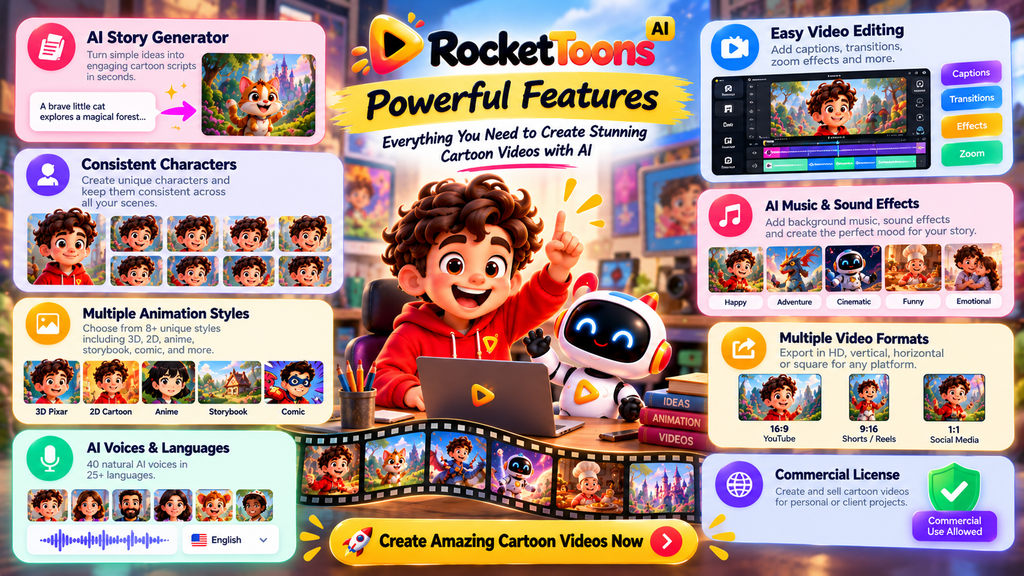
1. AI Story Writer – Turn Simple Ideas Into Cartoon Scripts
Every animated video begins with a story.
But coming up with an interesting beginning, middle, and ending isn’t always easy.
RocketToons includes an AI story-writing system designed to help users develop scripts from basic concepts.
The Commercial edition advertises:
- 11 story formats.
- 88 ready-made story ideas.
- 26 occasion-based presets.
- The ability to use existing scripts.
Suppose you want to create an educational cartoon about saving water.
You can describe your idea, identify the characters, and let the AI help develop a narrative around that topic.
Instead of presenting a dry explanation, you might create a story about a young inventor building a machine to save a village’s water supply.
That makes the message more memorable.
The AI can help with structure, but your own perspective remains important.
Good cartoons need interesting situations, believable character reactions, and a reason for viewers to care.
Best for: Storytellers, educational creators, beginners, and YouTube channel owners.
2. Consistent Character Engine – Keep Characters Recognizable
One of the biggest challenges in AI animation is keeping characters consistent.
Imagine creating a cartoon featuring a blue dragon wearing a yellow jacket.
In the opening scene, the dragon looks perfect.
But in the next scene, its face changes, the jacket disappears, or its proportions become completely different.
That breaks the illusion of a connected story.
RocketToons includes a Consistent Character Engine designed to maintain recognizable character appearances across poses, scenes, locations, and episodes.
This matters when developing recurring cartoon characters.
For example, a children’s educational channel might feature the same friendly scientist in every lesson.
Viewers gradually recognize the character and associate it with the content.
Consistent character design helps establish that familiarity.
AI results may still require inspection and correction, but this feature addresses a genuine production problem.
3. Custom Characters, Locations, and Props
Not every creator wants to use automatically generated characters.
Perhaps you’ve already designed a mascot for your business or created a fictional character you’d like to animate.
RocketToons supports uploading your own character references and incorporating them into stories.
It also provides tools for generating matching locations and props.
For instance, imagine a bakery that uses a smiling cartoon cupcake as its mascot.
The business could develop stories featuring that cupcake inside a colorful kitchen, a birthday party, or a fictional bakery.
Using familiar visual elements can help maintain a recognizable identity.
RocketToons also supports photo-to-cartoon creation, allowing photographs to become part of a cartoon-style workflow.
Only upload photographs, character designs, or other materials you’re authorized to use.
Best for: Businesses, brand mascots, original characters, and recurring animated series.
4. Eight Signature Cartoon Animation Styles
Different stories benefit from different visual styles.
A playful preschool lesson may need bright colors and simple shapes, while an action story might benefit from dramatic character designs.
RocketToons Commercial advertises eight signature styles.
| Animation Style | Suitable Creative Direction |
|---|---|
| Pixar-style 3D | Expressive three-dimensional cartoon stories |
| Classic 2D | Traditional animated storytelling |
| Preschool 2D | Bright, simple educational cartoons |
| Storybook | Illustrated stories and fairy tales |
| Ghibli-inspired | Atmospheric illustrated adventures |
| Action Anime | Dynamic action-oriented stories |
| Comic Book | Bold, graphic storytelling |
| Claymation | Playful handcrafted-looking animation |
These are advertised style categories, not indications of affiliation with any third-party animation studio.
Choosing a consistent visual direction can make your finished project feel more coherent.
The optional RocketToons Pro upgrade adds six additional cinematic styles, bringing the advertised total to fourteen.
For most beginners, the eight standard styles provide a useful range for experimentation.
5. AI Storyboard Builder and Scene Previews
A storyboard is like a visual roadmap for your video.
It shows what happens in each scene before you commit to producing the complete animation.
RocketToons includes storyboard previews and voiced animatics.
An animatic combines preliminary visuals with audio to demonstrate the sequence and timing of a story.
Let me explain why this matters.
Suppose you’ve written a three-minute cartoon featuring twelve scenes.
After examining the storyboard, you discover that two scenes repeat the same information and another scene doesn’t make sense.
Correcting those problems before generating all the animated clips can save credits and unnecessary revisions.
RocketToons lets you inspect the scene visuals and hear a preliminary audio version before proceeding.
This encourages a more deliberate creative process instead of generating everything immediately and hoping it works.
6. Scene Direction and Animation Controls
RocketToons offers two advertised animation workflows: generating animation from approved scene stills or animating directly from characters.
It also provides shot-level controls for camera movement, character action, sound effects, and clip duration.
You can use character mentions to specify which saved characters belong in a particular scene.
Imagine a cartoon where two friends are discussing a mysterious treasure map.
You might want the opening shot to establish the room, followed by a closer shot of the map and a character reaction.
Scene-direction controls help define those moments.
The software also keeps the last six takes of each shot, allowing users to switch between saved versions without repeating that same generation solely to return to a previous result.
For creators making multiple revisions, that flexibility can be particularly useful.
7. Natural AI Voices and Multilingual Dialogue
Voice acting is one of the most noticeable elements of an animated story.
A character’s voice can communicate excitement, fear, curiosity, or humor even before the audience fully understands the situation.
RocketToons Commercial advertises 40 natural AI voices across 25 supported languages.
The platform can assign voices to characters, helping creators develop distinct personalities.
You can also correct a line of dialogue without rebuilding the entire scene.
For example, imagine an animated science lesson where a character mispronounces a technical term.
Being able to adjust that individual line is more convenient than recreating a lengthy sequence.
Multilingual support may also help creators develop content for different audiences.
However, pronunciation and emotional delivery should always be checked, especially when working in unfamiliar languages.
RocketToons Pro adds thirty premium voice options and a Voiceover Studio with more precise word timing.
8. AI Music Composer and Audio Tools
Visual storytelling becomes more engaging when the sound matches the scene.
Think about a character discovering a hidden cave.
Soft, mysterious background music creates a different feeling from a cheerful tune.
RocketToons includes an AI Music Composer intended to generate original music that matches the story’s mood, pace, and energy.
The Commercial edition also advertises 38 music tracks.
Users can combine music with dialogue, scene audio, and other effects to improve the overall presentation.
To be honest, music isn’t a substitute for good storytelling.
But carefully chosen sound can make emotional moments stronger, comedy more playful, and transitions less abrupt.
The Pro edition adds AI-composed scores tailored to individual films.
9. Built-In Video Editing, Captions, and Transitions
Creating the animation is only part of the process.
Sometimes you need to trim scenes, refine the visual flow, add captions, or change the presentation.
RocketToons Commercial includes finishing tools such as:
- Nine visual transitions.
- Zoom-and-pan effects.
- Two word-by-word caption styles.
- Music and audio finishing options.
- Scene-level adjustments.
These tools allow users to prepare a more cohesive finished video without relying entirely on separate editing software.
The optional Pro upgrade expands these capabilities with a multi-track timeline, frame-accurate editing, premium captions, additional transitions, and a built-in media library.
The standard editing tools may be enough for simple cartoon projects.
Pro becomes more relevant when detailed editing control is a priority.
10. Multiple Video Formats and Social Publishing
Different platforms use different video shapes.
A traditional YouTube video is usually horizontal, while Instagram Reels and YouTube Shorts typically use vertical layouts.
RocketToons supports three export ratios:
| Format | Common Use |
|---|---|
| 16:9 | YouTube videos and widescreen content |
| 9:16 | Shorts, Reels, and vertical videos |
| 1:1 | Square social media videos |
The standard edition also advertises watermark-free HD MP4 downloads.
Supported one-click publishing integrations include Facebook, Instagram, YouTube, and LinkedIn.
For creators managing several channels, this can simplify parts of the publishing process.
Elite adds more advanced tools, including multiple connected accounts, scheduled publishing, batch posting, AI captions, hashtags, and channel analytics.
11. Recurring Cartoon Series and Episode Planning
RocketToons isn’t limited to isolated cartoon projects.
It also advertises tools for developing recurring series, generating next-episode ideas, and tracking episodes by character.
This is especially interesting for YouTube creators.
Suppose your channel features a young explorer who visits a new imaginary world each week.
Maintaining the same character and developing fresh adventures can help give the series continuity.
Instead of inventing the entire concept again for every video, you can build on established characters and storylines.
The creative direction remains yours, while the software assists with production planning.
12. Commercial License and Client Video Creation
RocketToons Commercial includes advertised commercial-use rights.
That makes it relevant to freelancers and businesses interested in producing animated content for commercial projects.
Possible applications include short promotional cartoons, animated explanations, social media content, and client storytelling videos.
For example, a local restaurant could commission a short cartoon about its fictional mascot introducing a new menu item.
A freelance creator could develop that animation using RocketToons, provided the project complies with the license.
Commercial rights don’t automatically grant ownership of third-party characters, music, trademarks, or other protected material.
Always check the complete license and use content you’re authorized to include.
RocketToons Commercial Features vs. Premium Upgrades
Not every advertised RocketToons capability is included in the starting edition.
Here’s a simple breakdown.
| Edition | Main Features | Advertised Price |
|---|---|---|
| Commercial | Core storytelling, characters, voices, animation and editing | $37 |
| Elite | Longer films, expanded credits and publishing | $47 |
| Pro | Advanced animation, voices and 1080p editing | $47 |
| Studio | Standalone clips, photo animation and video extension | $37 |
| Agent | AI chat-based creation workflows | $37 |
| Reseller | Software account-reselling rights | $97–$197 |
The Commercial edition advertises 5,000 initial credits, 500 additional credits monthly, up to 50 films of three minutes each, and 60-day cloud storage.
Elite removes the film-count cap and extends the maximum film length to fifteen minutes, but AI generation remains credit-based.
These are advertised pre-launch prices. Confirm current prices, upgrade eligibility, and terms before purchasing.
Explore our RocketToons Pricing and RocketToons OTO pages for more details.
Practical Ways to Use RocketToons
Understanding features is useful, but seeing how they fit into real projects makes the software easier to evaluate.
Create an Animated YouTube Story
Develop a recurring character, write a short adventure, choose an animation style, and generate scenes with dialogue.
For example, a comedy channel could feature two animals solving ridiculous problems in a fictional town.
Make Educational Cartoon Videos
Turn a difficult concept into an approachable animated explanation.
A teacher could create a story about planets, recycling, or basic mathematics, using fictional characters to make the lesson more memorable.
Educational facts should still be checked before publishing.
Produce Promotional Animations
Businesses can explore cartoon-style product explanations, mascot videos, and social media promotions.
A short story may communicate a product benefit more effectively than listing features on a static screen.
Create Videos for Clients
Freelancers can use the commercial creation tools to explore animation projects for businesses, educators, and content creators.
Success still depends on client communication, originality, editing quality, and professional delivery.
What Should You Know Before Using RocketToons?
RocketToons can simplify animation production, but there are practical limitations worth considering.
AI credits: Generating scenes and videos consumes processing resources. The exact number of finished cartoons you can create depends on generation settings and credit usage.
Production limits: The Commercial edition has film-count, duration, and storage allowances. Some restrictions can be expanded through Elite.
Quality control: AI-generated characters, dialogue, and movement may require adjustments. Consistency tools help, but they don’t eliminate every possible error.
Creative responsibility: The software can help create a video, but strong storytelling still requires judgment.
The biggest mistake people make is assuming that generating more content automatically produces better results.
A carefully planned, entertaining two-minute cartoon can be more effective than a longer video with a confusing storyline.
Start with a clear idea, preview your scenes, and refine the result before publishing.
RocketToons Features FAQs
1. What are the main RocketToons features?
RocketToons offers AI story writing, character creation, character consistency, eight animation styles, AI voices, multilingual dialogue, storyboards, animation controls, music, video editing, exports, and social publishing integrations.
2. Can beginners use RocketToons?
Yes. RocketToons is designed for people who don’t have traditional drawing or animation skills. Beginners can start with simple prompts or existing scripts and use AI-assisted production tools.
3. Does RocketToons support consistent characters?
Yes. The software advertises a Consistent Character Engine designed to preserve recognizable character appearances across scenes, poses, and episodes.
4. How many animation styles are available?
The Commercial edition advertises eight signature animation styles. Pro adds six additional cinematic styles, bringing the advertised total to fourteen.
5. Can RocketToons generate AI voiceovers?
Yes. The Commercial edition advertises 40 AI voices across 25 supported languages. Premium voice options are available through Pro.
6. Can I make YouTube Shorts with RocketToons?
Yes. RocketToons supports 9:16 vertical exports for short-form video, along with 16:9 horizontal and 1:1 square formats.
7. Can RocketToons create longer animated movies?
The Commercial edition supports films up to three minutes. Elite extends the advertised maximum duration to fifteen minutes.
8. Does RocketToons include commercial rights?
The Commercial edition advertises commercial-use licensing, allowing eligible users to create videos for commercial projects under the applicable terms.
9. Are all RocketToons features included in the standard edition?
No. Advanced editing, extended film limits, standalone clip generation, AI-agent workflows, and reseller rights are offered through optional upgrades.
10. Is RocketToons an unlimited AI video generator?
Not in the sense of unlimited processing. RocketToons uses generation credits, and the standard edition has production limits. Elite removes the film-count cap, but credit allowances still matter.
Final Thoughts – Explore What RocketToons Can Create
RocketToons combines several creative tools into a connected AI cartoon production workflow.
From script writing and character creation to animation, dialogue, music, and editing, its features are designed to make animated storytelling more accessible.
The character consistency engine, storyboard previews, shot controls, and multilingual voices are particularly relevant to creators who want to produce connected stories rather than isolated animated clips.
For beginners, the Commercial edition provides a practical starting point.
More advanced creators can consider Elite, Pro, Studio, or Agent when their projects require additional production capabilities.
The real opportunity isn’t simply creating cartoons faster.
It’s having more freedom to experiment with ideas that previously felt too difficult or time-consuming to produce.
Your imagination provides the story. RocketToons provides tools to help bring it to life.
Ready to Create Your First AI Cartoon?
Explore RocketToons, compare its features, and discover how AI-powered animation can fit into your creative workflow.
View the available RocketToons packages, current pricing, AI-credit allowances, and purchase terms.